Duval County court records provide official information about legal cases filed within the county. These records include details such as case numbers, parties involved, filed motions, judgments, and other court documents. Access to these records allows the public, legal professionals, and researchers to review case information accurately and efficiently. Whether you need information for personal, legal, or research purposes, understanding what court records include can save time and ensure you find the correct documents.
Public access to court case files in Duval County is managed through official systems that maintain both online and in-person resources. Most civil and criminal cases are available to view or request, while certain records may be restricted or redacted to protect sensitive information. By learning how to use these resources, users can locate the records they need, check case statuses, and obtain certified copies when required. This section introduces the essential steps to start your search and access Duval County court records confidently.
How to Search Duval County Court Records
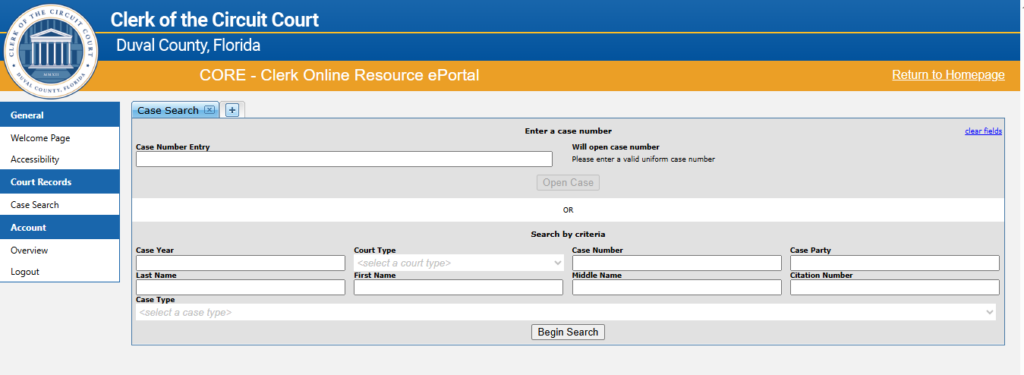
The Duval County CORE (Clerk Online Resource ePortal) is the official platform for searching and accessing court records online. It provides a convenient way to view case information, court filings, and other legal documents related to the Duval County Court without visiting the courthouse in person. Whether you are an attorney, a party to a case, or a member of the public, the CORE portal makes it easier to find the information you need.
Official CORE Portal URL: https://core.duvalclerk.com/
Open the CORE Portal
- Open your preferred web browser (Chrome, Safari, Firefox, or Edge).
- Type or click the official portal link: https://core.duvalclerk.com/
- You will land on the home page of the Duval County Clerk’s Online Portal, where search tools and registration options are available.
Choose Access Type
The portal provides two levels of access:
- Public Access (No Login Required)
- Search for basic case details such as case numbers, party names, hearing dates, and case status.
- Free and easy to use.
- Registered User Access
- Allows enhanced access to certain documents and notifications.
- Registration requires filling a form and confirming your identity with the Clerk’s office.
- Recommended if you frequently need court documents or access to restricted files.
Prepare Your Search Details
Before searching, gather the following information for more accurate results:
- Case Number (if available)
- Party Name (Plaintiff, Defendant, or Attorney)
- Case Type (Civil, Criminal, Family, Traffic, etc.)
- Filing Date or Date Range (optional)
Conduct the Search
- On the CORE portal, click “Search Court Records” or navigate to the search bar.
- Enter the information collected in Step 3.
- Select filters if necessary (such as case type or filing date).
- Click Search.
Review Case Details
After finding the correct case:
- Click on the case to view more details.
- You may access:
- Docket entries
- Motions
- Orders
- Judgments (if available)
- Some documents may be restricted or require approval. Public users might see “View on Request”, meaning the Clerk must authorize access.
Request Restricted Documents (If Needed)
- For documents that are not publicly viewable:
- Once approved, the document can be downloaded or viewed online.
- Registered users can submit a document request through the portal.
- Provide your account details and the specific document(s) needed.
- Wait for Clerk’s office approval.
Accessing Court Records Through the Duval County CORE Portal
Searching for court records in Duval County is straightforward using the CORE Portal. This official online system allows users to perform a case search Duval or case lookup Duval quickly and efficiently. Whether you are checking civil, criminal, family, or traffic court cases, the portal provides a clear and easy-to-use interface to access public case information.
Official CORE Portal: https://core.duvalclerk.com/
Key Steps to Use the CORE Portal Effectively
Registration requires submitting a form to the Clerk’s office and waiting for approval.d helps you locate the records you need efficiently.
- Choose Your Search Type
Enter a case number, party name, or citation number to start your search.
Selecting the correct case type ensures more accurate results. - Apply Filters
Narrow your search by case type, filing date, or court division.
Filters help you quickly locate the case you need. - View Case Details
Click on a case to see filings, motions, orders, and judgments that are publicly available.
Check case status, parties involved, and upcoming hearing dates. - Download Documents
Certain documents can be downloaded or printed for personal use.
Restricted documents may show “View on Request”, requiring Clerk approval. - Check for Restrictions
Some records may be sealed or partially redacted for privacy reasons.
Family law, probate, or older cases may have additional access requirements.
Types of Duval County Court Records
Duval County court records cover a wide range of legal documents that are accessible to the public through official channels. Whether you are looking for civil filings, criminal cases, or other court-related information, understanding the types of records available online can help you access the information you need efficiently.
Civil Court Records
Civil court records include disputes between individuals, organizations, or businesses. These records often involve contract disagreements, property claims, personal injury cases, or other non-criminal matters. Users can access case filings, motions, orders, and final judgments through the Duval County court system. Online civil case search tools allow you to filter by party name, case number, or filing date, making it easier to track the progress of a case or review court decisions. Accessing civil dockets can also help in verifying legal proceedings and checking the status of ongoing matters.
Criminal Court Records
Criminal court records document offenses ranging from misdemeanors to serious felonies. These records include charges, motions, court hearings, and final judgments. Online access allows for felony case lookup and misdemeanor records searches, providing insight into legal outcomes and procedural history. While most records are public, some may include redactions to protect sensitive information. Users can also check traffic-related cases, such as citation lookup and traffic ticket case files, through the official portals.
Accessing Duval County Court Records
All these records are part of the broader Duval County court records system, which offers structured online search tools for easy access. Knowing what types of records exist and how they are categorized helps users locate information quickly and understand case details without unnecessary delays.
What You Can—and Cannot—See in Duval Court Records
When searching for Duval County court records, it’s helpful to know which information is publicly accessible and which is restricted. Understanding these boundaries can save time and prevent frustration.
Publicly Accessible Court Records
Most court records in Duval County are available for public viewing. This typically includes case numbers, filing dates, party names, attorney information, and case status. You can often access civil and criminal filings, motions, and court orders. These records are useful for background checks, legal research, and verifying case outcomes. Many of these documents are available through the official CORE portal, allowing users to search by case number, party name, or citation.
Restricted or Sealed Records
Some court records are confidential and cannot be viewed by the public. Sealed cases, such as juvenile records or certain family law matters, are protected to safeguard privacy. Additionally, criminal cases may contain redacted information to protect victims or sensitive details. Adoption records and some domestic violence proceedings are also confidential. Attempting to access these records without proper authorization will not succeed.
Understanding Redactions
Redactions appear as blacked-out sections within documents. They are applied to protect private information, including Social Security numbers, financial details, or addresses. Even in publicly available cases, some portions may be intentionally hidden to comply with privacy laws.
Knowing what can and cannot be accessed helps users focus on actionable searches while respecting privacy rules. For anyone using Duval County court records, being aware of these distinctions ensures accurate and efficient research.
How to Request Certified Copies of Court Records
If you need official documentation from Duval County court cases, requesting certified copies ensures you receive accurate, legally recognized records. Certified copies are often required for legal proceedings, background verification, or personal record-keeping. The process is straightforward and can be completed in person, by mail, or, in some cases, online. Understanding each step will help you avoid delays and ensure you receive the correct documents efficiently.
Identify the Case
The first step in requesting certified copies is to gather all relevant case information. This includes the case number, the names of the parties involved, and the filing date, if available. Having these details ready ensures the clerk’s office can locate the records quickly and reduces the chances of errors or delays. Accurate case information is especially important if multiple filings exist under the same case number.
What to prepare:
- Case number
- Names of all parties involved
- Filing date, if known
Contact the Clerk of Courts
Next, contact the Duval County Clerk of Courts to obtain the necessary forms and instructions. You can visit the Clerk’s office in person or access their official website to find downloadable request forms. Court staff are available to answer questions and provide guidance on which forms are required for civil, criminal, or probate records. Checking the website beforehand can also help confirm office hours, submission options, and current processing times.
Helpful tips:
- Visit the official Clerk’s website for forms
- Call the office for guidance on specific records
- Verify office hours and submission methods
Complete the Request Form
Once you have the forms, fill in all required details carefully. Specify the type of record you are requesting, such as civil or criminal case documents, and include accurate case numbers, party names, and filing dates. Incomplete or incorrect forms can cause delays or returned requests. Double-check all information before submitting to ensure the clerk’s office can process your request efficiently.
Remember to include:
- Type of record (civil, criminal, probate)
- Case number and party names
- Filing dates or document reference
Pay the Applicable Fees
Certified copies of court records typically involve a small fee per page or per document. Fees vary depending on the type of record requested, so it is advisable to confirm the exact amount with the clerk’s office before submission. Payments can usually be made in person, by check, money order, or approved online payment methods. Keeping a receipt of your payment is helpful if any issues arise during processing.
Fee-related tips:
- Confirm current fees with the Clerk’s office
- Use accepted payment methods
- Keep a receipt as proof of payment
Submit the Request
After completing the form and preparing the payment, submit your request through the available channels. Requests can usually be submitted in person, by mail, or, in some cases, online. Include identification and payment as required. Following the proper submission procedures ensures your request is processed efficiently, and that the certified copies are prepared correctly for legal use.
Submission reminders:
- Include valid identification
- Ensure payment is attached
- Follow instructions for in-person, mail, or online submission
Receive the Certified Copies
Once processed, certified copies are either mailed to you or handed over in person. Processing times vary depending on case complexity, the number of documents requested, and current workloads at the Clerk’s office. These certified copies provide official verification of case information and are recognized for all legal and administrative purposes. Following each step carefully helps you obtain records efficiently and without unnecessary delays.
After receiving copies:
- Use certified copies for legal or official purposes
- Verify all documents are correct
- Keep copies for your records
In-Person Court Records Access
Accessing Duval County court records in person provides a reliable way to view official documents, especially when online searches are limited. This method ensures access to complete records, including older cases or filings that may not be fully available online. By visiting the courthouse, you can work directly with public terminals and court staff to locate the exact documents you need.
Visiting the Courthouse Records Division
The courthouse records division is open to the public and allows onsite lookup of civil, criminal, and other case files. Public terminals are available to search by case number, party name, or attorney, making the process straightforward. Court staff are present to guide visitors, answer questions, and help with locating specific files. Onsite access also ensures you can view records that are restricted or unavailable through online searches.
What to Bring and Prepare
To make your visit efficient, it’s important to bring valid identification and any relevant case details. Having accurate information about the case or parties involved will save time at the records desk. Being prepared also helps staff assist you more quickly and ensures you can access the correct files without delay.
Helpful items to bring:
- Government-issued ID
- Case numbers, party names, or attorney information
- Any previous court correspondence
Printing, Copying, and Certified Records
The courthouse provides printing and copying services for most public records. However, some documents may require a formal request to obtain certified copies, particularly for official legal or administrative purposes. Onsite access allows you to review documents that are incomplete online, including older civil or criminal filings. Always ask court staff about the proper procedures to request certified copies.
Key points:
- Older filings may only be accessible in person
- Printing and copying available onsite
- Certified copies require formal requests
Duval County Court Records Location
The Duval County Courthouse is centrally located in Jacksonville, Florida, making it accessible for those who need to access court records in person. The Records Division is typically housed within the main courthouse building, where visitors can search civil, criminal, and probate cases. Knowing the exact location and office hours ahead of time helps ensure a smooth visit and minimizes waiting time.
Location Details:
- Address: 330 E. Bay Street, Jacksonville, FL 32202
- Records Division: Main Courthouse, 1st Floor
- Public Access Hours: Monday–Friday, 8:30 AM – 5:00 PM
- Phone: (904) 255-2000 (for inquiries before visiting)
Frequently Asked Questions
Finding court records in Duval County can raise several questions. This section answers the most common concerns and provides detailed guidance to help you access the information you need efficiently. Whether you are searching online or planning an in-person visit, understanding the rules, procedures, and limitations can save time and ensure you locate accurate and complete records.
How do I search Duval County court records?
Duval County court records can be searched online using the Duval County Clerk of Courts’ CORE Portal, which is the official case lookup system. To perform a search, you can enter a case number, party name, or attorney information. The portal allows you to filter searches by case type, including civil, criminal, probate, and traffic cases. For best results, make sure names are spelled correctly and include any middle initials if known. The system also displays case status, filing dates, and related documents, providing a comprehensive overview of each case. Users should note that not all records may be fully digitized, so older filings might require an in-person visit.
Can I access both civil and criminal court records?
Yes, most civil and criminal cases in Duval County are accessible through online searches. Civil records cover disputes such as contracts, property matters, personal injury cases, and other non-criminal proceedings. Criminal records include information on misdemeanors, felonies, traffic offenses, and case outcomes. However, there are restrictions on certain types of cases, including juvenile cases, sealed records, and some family law matters, which are not available to the public online. Even within public records, sensitive details such as Social Security numbers, financial information, and protected victim information may be redacted. Accessing these restricted cases typically requires an in-person request or legal authorization.
How do I get certified copies of court records?
Certified copies are official copies of court documents issued by the Duval County Clerk of Courts and are often required for legal, administrative, or official purposes. These can be requested in person at the courthouse, by mail, or through approved online forms. There is a small fee for each certified copy, which varies depending on the type of document and the number of pages. Requests submitted online or by mail usually take a few business days to process, while in-person requests may be completed faster, especially for older or archived records. It is important to specify the exact document you need, including case numbers and filing dates, to avoid delays in processing your request.
Why can’t I find a specific case?
If you are unable to locate a case, it may be due to several reasons. The case could be sealed, confidential, or otherwise restricted from public access. Alternatively, it might not yet be digitized, especially if it is an older filing from before electronic record-keeping was standard. Errors in spelling, missing middle initials, or incorrect case numbers can also prevent records from appearing in the search results. For cases that are not available online, visiting the courthouse in person or contacting court staff can help you access these records. Staff can guide you to the correct division or provide instructions for submitting formal requests for older or restricted documents.
Are there any limitations on viewing court records online?
Yes, there are important limitations when accessing court records online. Certain sensitive information, such as personal identifiers, financial records, and protected victim details, is often redacted to protect privacy. Family law cases, juvenile records, and cases involving domestic violence may be entirely restricted from public view. Some documents, including older filings, are not fully uploaded and require an in-person review at the courthouse. Additionally, online systems only provide access to official court records; supporting documents held outside the clerk’s office, such as evidence exhibits, may not be available online. For complete access, especially for restricted or sealed cases, formal requests, legal authorization, or in-person visits are typically required.